
Description
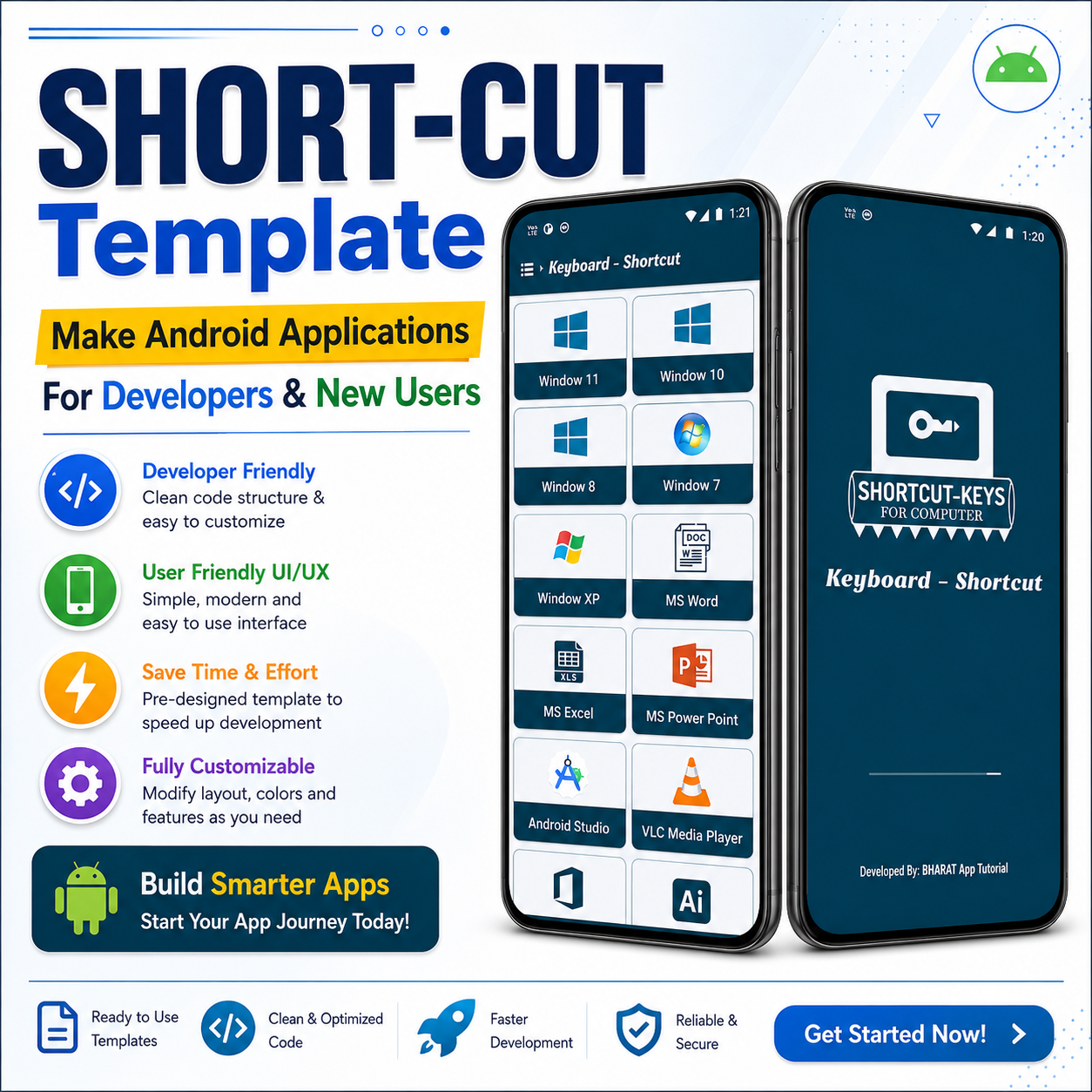
Shortcut-Keys App Template (Latest UI + Latest Java Code)
Build a modern and professional Keyboard Shortcut Keys Android App with this ready-to-use Java App Template. Designed using the latest Material Design principles, this template helps developers, students, and content creators launch a shortcut reference app quickly without starting from scratch.
Whether you’re creating a Computer Shortcut Keys Guide, MS Office Shortcut Keys, Windows Commands, Android Studio Shortcuts, or a complete productivity learning app, this template provides a clean architecture and an attractive user interface.
✨ Key Features
- ✅ Latest Material Design UI
- ✅ 100% Java Source Code
- ✅ Android Studio (Latest Version) Compatible
- ✅ Material 3 Components
- ✅ RecyclerView with Search Functionality
- ✅ Category-wise Shortcut Keys
- ✅ Beautiful Card-Based Layout
- ✅ Light & Dark Mode Support
- ✅ Splash Screen API Support
- ✅ Edge-to-Edge Display
- ✅ Smooth Animations
- ✅ Favorites / Bookmark Feature
- ✅ Offline Database Support
- ✅ Fast Search Filter
- ✅ Responsive UI for All Screen Sizes
- ✅ Clean & Well-Commented Java Code
- ✅ Easy Customization
- ✅ High Performance
- ✅ AdMob Ready Integration
- ✅ Push Notification Ready
- ✅ Easy to Add New Categories
- ✅ Modern Navigation
- ✅ Professional Project Structure
📚 Template Categories
- Computer Shortcut Keys
- Windows Shortcut Keys
- MS Word Shortcut Keys
- MS Excel Shortcut Keys
- MS PowerPoint Shortcut Keys
- Google Chrome Shortcut Keys
- Android Studio Shortcut Keys
- VS Code Shortcut Keys
- Photoshop Shortcut Keys
- Tally Shortcut Keys
- Internet Browser Shortcut Keys
- Programming Shortcut Keys
- Custom Categories
💻 Technology Used
- Latest Java
- Android Studio (Latest Version)
- Material Design 3
- RecyclerView
- CardView
- ConstraintLayout
- SearchView
- ViewBinding
- SharedPreferences
- SQLite / Local Storage
- XML UI
- AndroidX Libraries
🎯 Perfect For
- Android Developers
- Students
- Teachers
- Computer Institutes
- YouTube Tutorial Creators
- Educational Apps
- Productivity Apps
- Learning Applications
📦 Package Includes
- Complete Android Studio Project
- Full Java Source Code
- XML Layout Files
- Material Icons
- Documentation
- Easy Setup Guide
⭐ Why Choose This Template?
- Save development time
- Professional and modern UI
- Clean coding standards
- Beginner-friendly project
- Easy to customize
- Ready for publishing
- Offline functionality
- Optimized performance
- Future-ready architecture
Build your own professional Shortcut Keys Android App in minutes with a clean Material Design interface and the latest Java implementation. Perfect for learning, customization, and publishing on the Google Play Store.
Reviews
There are no reviews yet.