

In this blog, we are going to create a LogIn & SignUp UI Design Layout in Android Studio. We will provide the latest code UI/UX layout for the user, reliable for the Android App.
Before creating the project, we have provided some assets to support its development.
- Implement the App Color Code in the “colors.xml” file.
Here, we have to insert the color code to customise your application project.
<?xml version="1.0" encoding="utf-8"?>
<resources>
    <color name="purple_200">#FFBB86FC</color>
    <color name="purple_500">#024265</color>
    <color name="purple_700">#012F49</color>
    <color name="teal_200">#FF03DAC5</color>
    <color name="teal_700">#FF018786</color>
    <color name="black">#FF000000</color>
    <color name="white">#FFFFFFFF</color>
    <color name="light_purple_700">#435863</color>
</resources>
- Replace “Action Bar” with “No Action Bar”.
<resources xmlns:tools="http://schemas.android.com/tools">
    <!-- Base application theme. -->
    <style name="Theme.UIDesignLoginSignUp" parent="Theme.MaterialComponents.DayNight.NoActionBar">
        <!-- Primary brand color. -->
        <item name="colorPrimary">@color/purple_500</item>
        <item name="colorPrimaryVariant">@color/purple_700</item>
        <item name="colorOnPrimary">@color/white</item>
        <!-- Secondary brand color. -->
        <item name="colorSecondary">@color/teal_200</item>
        <item name="colorSecondaryVariant">@color/teal_700</item>
        <item name="colorOnSecondary">@color/black</item>
        <!-- Status bar color. -->
        <item name="android:statusBarColor">?attr/colorPrimaryVariant</item>
        <!-- Customize your theme here. -->
    </style>
</resources>
- Please import the “string.xml” code below.
We need to import some important text string code into a string.xml file.
<resources>
<string name="app_name">UI Design Login & SignUp</string>
<string name="ui_design">LOG IN & SIGN UP UI DESIGN</string>
<string name="email_id">Enter Your Email ID</string>
<string name="password">Password</string>
<string name="login">Login</string>
<string name="forgot_password">Forgot Password</string>
<string name="name">Name</string>
<string name="confirm_password">Confirm Password</string>
<string name="signup">Signup</string>
</resources>
Insert assets into the LogIn & SignUp UI Layout.
We need a LOGO and Text Image for this project. So, download Assets now.
Create a design Button and some social media icons under the drawable folder.
If you want to download all the assets above directly, click the download button.
We have to import and create some background and icons for ui design, which are given below:
- Create or implement a “button_bg.xml” file.
<?xml version="1.0" encoding="utf-8"?>
<shape xmlns:android="http://schemas.android.com/apk/res/android">

    <corners android:radius="100dp"/>
    <solid android:color="@color/purple_700"/>

</shape>
- Create or implement an “edit_text_bg.xml” file.
<?xml version="1.0" encoding="utf-8"?>
<shape xmlns:android="http://schemas.android.com/apk/res/android">

    <corners android:radius="4dp" />
    <stroke
        android:width="2dp"
        android:color="@color/light_purple_700" />

</shape>
- Create or implement a “facebook.xml” file.
<?xml version="1.0" encoding="utf-8"?>
<vector xmlns:android="http://schemas.android.com/apk/res/android"
    android:width="24dp"
    android:height="24dp"
    android:viewportWidth="24"
    android:viewportHeight="24">

    <path
        android:fillColor="@color/purple_700"
        android:pathData="M15.997 3.985h2.191v-3.816c-0.378-0.052-1.678-0.169-3.192-0.169-3.159 0-5.323 1.987-5.323 5.639v3.361h-3.486v4.266h3.486v10.734h4.274v-10.733h3.345l0.531-4.266h-3.877v-2.939c0.001-1.233 0.333 -2.077 2.051-2.077z" />
</vector>
- Create or implement a “google.xml” file.
<vector xmlns:android="http://schemas.android.com/apk/res/android"
    android:width="512dp"
    android:height="512dp"
    android:viewportWidth="512"
    android:viewportHeight="512">
    <path
        android:fillColor="#59C36A"
        android:pathData="M420.7 450.7c-44.4 37.5 -101.999 61.3 -164.7 61.3 -93.3 0 -175.201 -51.4 -219.6 -126.4l16.622 -76.622 73.678 -13.678c17.1 55.199 68.699 95.7 129.3 95.7 29.399 0 56.7 -9.3 79.2 -25.8l70.8 10.8z" />
    <path
        android:fillColor="#00A66C"
        android:pathData="M420.7 450.7l-14.7 -74.7 -70.8 -10.8c-22.5 16.5 -49.801 25.8 -79.2 25.8v121c62.701 0 120.3 -23.8 164.7 -61.3z" />
    <path
        android:fillColor="#FFDA2D"
        android:pathData="M121 256c0 13.799 2.1 26.999 5.7 39.3l-90.3 90.3c-22.5 -37.8 -36.4 -82.201 -36.4 -129.6 0 -47.401 13.9 -91.8 36.4 -129.6l72.473 12.473 17.827 77.827c-3.6 12.299 -5.7 25.499 -5.7 39.3z" />
    <path
        android:fillColor="#4086F4"
        android:pathData="M512 256c0 77.999 -36.099 147.9 -91.3 194.7l-85.5 -85.5c17.399 -12.601 32.1 -29.401 41.7 -49.2h-120.9c-8.401 0 -15 -6.601 -15 -15v-90c0 -8.401 6.599 -15 15 -15h236.8c7.2 0 13.5 5.099 14.7 12.299 3 15.601 4.5 31.8 4.5 47.701z" />
    <path
        android:fillColor="#4175DF"
        android:pathData="M376.901 316c-9.6 19.799 -24.302 36.599 -41.7 49.2l85.499 85.5c55.201 -46.8 91.3 -116.7 91.3 -194.7 0 -15.901 -1.5 -32.1 -4.501 -47.701 -1.199 -7.2 -7.5 -12.299 -14.7 -12.299h-236.799v120z" />
    <path
        android:fillColor="#FF641A"
        android:pathData="M424.9 71.499c0.3 4.2 -1.5 8.101 -4.2 11.1l-64.2 63.9c-5.099 5.4 -13.499 6 -19.499 1.5 -23.702 -17.699 -51.602 -26.999 -81.001 -26.999 -60.601 0 -112.2 40.499 -129.3 95.7l-90.3 -90.3c44.399 -75 126.3 -126.4 219.6 -126.4 59.7 0 117.9 22 163.5 60.399 3.3 2.701 5.1 6.9 5.4 11.1z" />
    <path
        android:fillColor="#F03800"
        android:pathData="M337 147.999c6 4.501 14.399 3.9 19.499 -1.5l64.2 -63.9c2.701 -2.999 4.501 -6.899 4.2 -11.1s-2.1 -8.399 -5.4 -11.1c-45.599 -38.399 -103.799 -60.399 -163.499 -60.399v121c29.399 0 57.299 9.3 81 26.999z" />
</vector>
- Create or implement a “phone_call.xml” file.
<vector xmlns:android="http://schemas.android.com/apk/res/android"
    android:width="513.64dp"
    android:height="513.64dp"
    android:viewportWidth="513.64"
    android:viewportHeight="513.64">
    <path
        android:fillColor="@color/purple_700"
        android:pathData="M499.66 376.96l-71.68 -71.68c-25.6 -25.6 -69.12 -15.359 -79.36 17.92c-7.68 23.041 -33.28 35.841 -56.32 30.72c-51.2 -12.8 -120.32 -79.36 -133.12 -133.12c-7.68 -23.041 7.68 -48.641 30.72 -56.32c33.28 -10.24 43.52 -53.76 17.92 -79.36l-71.68 -71.68c-20.48 -17.92 -51.2 -17.92 -69.12 0l-48.64 48.64c-48.64 51.2 5.12 186.88 125.44 307.2c120.32 120.32 256 176.641 307.2 125.44l48.64 -48.64C517.581 425.6 517.581 394.88 499.66 376.96z" />
</vector>
- Create or implement a view_bg.xml” file.
<?xml version="1.0" encoding="utf-8"?>
<shape xmlns:android="http://schemas.android.com/apk/res/android">

    <solid android:color="@color/white" />
    <corners
        android:topLeftRadius="32dp"
        android:topRightRadius="32dp" />

</shape>
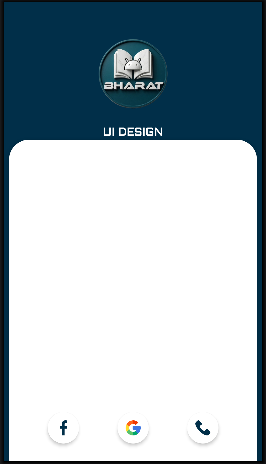
Create a “activity_main.xml” UI Design Layout.
<?xml version="1.0" encoding="utf-8"?>
<androidx.constraintlayout.widget.ConstraintLayout xmlns:android="http://schemas.android.com/apk/res/android"
    xmlns:app="http://schemas.android.com/apk/res-auto"
    xmlns:tools="http://schemas.android.com/tools"
    android:id="@+id/main"
    android:layout_width="match_parent"
    android:layout_height="match_parent"
    android:background="@color/purple_700"
    tools:context=".MainActivity">

    <View
        android:id="@+id/view"
        android:layout_width="match_parent"
        android:layout_height="300dp"
        app:layout_constraintBottom_toBottomOf="parent"
        app:layout_constraintEnd_toEndOf="parent"
        app:layout_constraintHorizontal_bias="1.0"
        app:layout_constraintStart_toStartOf="parent"
        app:layout_constraintTop_toTopOf="parent"
        app:layout_constraintVertical_bias="0.0"
        app:layout_constraintWidth_percent=".27" />

    <ImageView
        android:id="@+id/imageView"
        android:layout_width="120dp"
        android:layout_height="120dp"
        android:contentDescription="@string/app_name"
        android:elevation="2dp"
        android:src="@drawable/logo"
        app:layout_constraintBottom_toBottomOf="@+id/view"
        app:layout_constraintEnd_toEndOf="parent"
        app:layout_constraintStart_toStartOf="parent"
        app:layout_constraintTop_toTopOf="@+id/view"
        app:layout_constraintVertical_bias=".3" />

    <TextView
        android:id="@+id/textView"
        android:layout_width="wrap_content"
        android:layout_height="wrap_content"
        android:fontFamily="@font/aldrich"
        android:text="@string/ui_design"
        android:textColor="@color/white"
        android:textSize="22sp"
        android:textStyle="bold"
        app:layout_constraintBottom_toBottomOf="@+id/view"
        app:layout_constraintEnd_toEndOf="parent"
        app:layout_constraintStart_toStartOf="parent"
        app:layout_constraintTop_toBottomOf="@+id/imageView"
        app:layout_constraintVertical_bias=".2" />

    <androidx.constraintlayout.widget.ConstraintLayout
        android:id="@+id/constraintLayout"
        android:layout_width="match_parent"
        android:layout_height="0dp"
        android:layout_marginStart="8dp"
        android:layout_marginEnd="8dp"
        android:background="@drawable/view_bg"
        android:elevation="3dp"
        app:layout_constraintBottom_toBottomOf="parent"
        app:layout_constraintEnd_toEndOf="parent"
        app:layout_constraintHeight_percent=".70"
        app:layout_constraintStart_toStartOf="parent"
        app:layout_constraintTop_toBottomOf="@+id/view"
        app:layout_constraintVertical_bias="1">

        <com.google.android.material.tabs.TabLayout
            android:id="@+id/tabLayout"
            android:layout_width="match_parent"
            android:layout_height="wrap_content"
            android:background="@android:color/transparent"
            app:layout_constraintBottom_toBottomOf="parent"
            app:layout_constraintEnd_toEndOf="parent"
            app:layout_constraintStart_toStartOf="parent"
            app:layout_constraintTop_toTopOf="parent"
            app:layout_constraintVertical_bias="0" />

        <androidx.viewpager.widget.ViewPager
            android:id="@+id/viewPager"
            android:layout_width="match_parent"
            android:layout_height="0dp"
            app:layout_constraintBottom_toBottomOf="parent"
            app:layout_constraintEnd_toEndOf="parent"
            app:layout_constraintHeight_percent=".7"
            app:layout_constraintStart_toStartOf="parent"
            app:layout_constraintTop_toBottomOf="@+id/tabLayout"
            app:layout_constraintVertical_bias="0" />

        <androidx.cardview.widget.CardView
            android:id="@+id/google_login"
            android:layout_width="50dp"
            android:layout_height="50dp"
            android:clickable="true"
            android:focusable="true"
            android:foreground="?android:attr/selectableItemBackground"
            app:cardBackgroundColor="@color/white"
            app:cardCornerRadius="100dp"
            app:cardElevation="3dp"
            app:layout_constraintBottom_toBottomOf="parent"
            app:layout_constraintEnd_toEndOf="parent"
            app:layout_constraintStart_toStartOf="parent"
            app:layout_constraintTop_toBottomOf="@+id/viewPager">

            <RelativeLayout
                android:layout_width="match_parent"
                android:layout_height="match_parent"
                android:gravity="center">

                <ImageView
                    android:layout_width="24dp"
                    android:layout_height="24dp"
                    android:contentDescription="@string/app_name"
                    android:src="@drawable/google" />
            </RelativeLayout>

        </androidx.cardview.widget.CardView>

        <androidx.cardview.widget.CardView
            android:id="@+id/facebook_login"
            android:layout_width="50dp"
            android:layout_height="50dp"
            android:clickable="true"
            android:focusable="true"
            android:foreground="?android:attr/selectableItemBackground"
            app:cardBackgroundColor="@color/white"
            app:cardCornerRadius="100dp"
            app:cardElevation="3dp"
            app:layout_constraintBottom_toBottomOf="parent"
            app:layout_constraintEnd_toStartOf="@+id/google_login"
            app:layout_constraintStart_toStartOf="parent"
            app:layout_constraintTop_toBottomOf="@+id/viewPager">

            <RelativeLayout
                android:layout_width="match_parent"
                android:layout_height="match_parent"
                android:gravity="center">

                <ImageView
                    android:layout_width="24dp"
                    android:layout_height="24dp"
                    android:contentDescription="@string/app_name"
                    android:src="@drawable/facebook" />


            </RelativeLayout>

        </androidx.cardview.widget.CardView>

        <androidx.cardview.widget.CardView
            android:id="@+id/phone_login"
            android:layout_width="50dp"
            android:layout_height="50dp"
            android:clickable="true"
            android:focusable="true"
            android:foreground="?android:attr/selectableItemBackground"
            app:cardBackgroundColor="@color/white"
            app:cardCornerRadius="100dp"
            app:cardElevation="3dp"
            app:layout_constraintBottom_toBottomOf="parent"
            app:layout_constraintEnd_toEndOf="parent"
            app:layout_constraintStart_toEndOf="@+id/google_login"
            app:layout_constraintTop_toBottomOf="@+id/viewPager">

            <RelativeLayout
                android:layout_width="match_parent"
                android:layout_height="match_parent"
                android:gravity="center">

                <ImageView
                    android:layout_width="24dp"
                    android:layout_height="24dp"
                    android:contentDescription="@string/app_name"
                    android:src="@drawable/phone_call" />


            </RelativeLayout>


        </androidx.cardview.widget.CardView>


    </androidx.constraintlayout.widget.ConstraintLayout>

</androidx.constraintlayout.widget.ConstraintLayout>
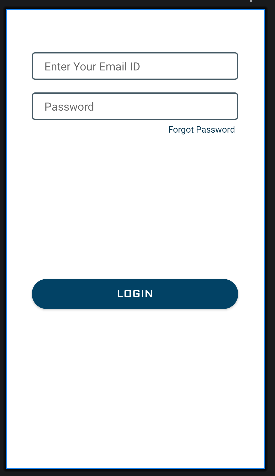
Create a “fragment_login.xml” UI Design Layout.
<?xml version="1.0" encoding="utf-8"?>
<androidx.constraintlayout.widget.ConstraintLayout xmlns:android="http://schemas.android.com/apk/res/android"
    xmlns:app="http://schemas.android.com/apk/res-auto"
    xmlns:tools="http://schemas.android.com/tools"
    android:layout_width="match_parent"
    android:layout_height="match_parent"
    tools:context=".LoginFragment">

    <EditText
        android:id="@+id/email_id"
        android:layout_width="0dp"
        android:layout_height="wrap_content"
        android:autofillHints=""
        android:background="@drawable/edit_text_bg"
        android:hint="@string/email_id"
        android:inputType="textEmailAddress"
        android:paddingStart="20dp"
        android:paddingTop="10dp"
        android:paddingBottom="10dp"
        android:textColor="@color/purple_700"
        app:layout_constraintBottom_toBottomOf="parent"
        app:layout_constraintEnd_toEndOf="parent"
        app:layout_constraintHorizontal_bias=".5"
        app:layout_constraintStart_toStartOf="parent"
        app:layout_constraintTop_toTopOf="parent"
        app:layout_constraintVertical_bias=".1"
        app:layout_constraintWidth_percent=".8" />

    <EditText
        android:id="@+id/password"
        android:layout_width="0dp"
        android:layout_height="wrap_content"
        android:layout_marginTop="20dp"
        android:autofillHints=""
        android:background="@drawable/edit_text_bg"
        android:hint="@string/password"
        android:inputType="textPassword"
        android:paddingStart="20dp"
        android:paddingTop="10dp"
        android:paddingBottom="10dp"
        android:textColor="@color/purple_700"
        app:layout_constraintBottom_toBottomOf="parent"
        app:layout_constraintEnd_toEndOf="parent"
        app:layout_constraintHorizontal_bias=".5"
        app:layout_constraintStart_toStartOf="parent"
        app:layout_constraintTop_toBottomOf="@+id/email_id"
        app:layout_constraintVertical_bias="0"
        app:layout_constraintWidth_percent=".8" />

    <Button
        android:id="@+id/loginButton"
        android:layout_width="0dp"
        android:layout_height="wrap_content"
        android:background="@drawable/button_bg"
        android:fontFamily="@font/aldrich"
        android:text="@string/login"
        android:textColor="@color/white"
        android:textSize="16sp"
        android:textStyle="bold"
        app:layout_constraintBottom_toBottomOf="parent"
        app:layout_constraintEnd_toEndOf="parent"
        app:layout_constraintStart_toStartOf="parent"
        app:layout_constraintTop_toBottomOf="@+id/password"
        app:layout_constraintWidth_percent=".8" />

    <TextView
        android:id="@+id/forgotPassword"
        android:layout_width="wrap_content"
        android:layout_height="wrap_content"
        android:layout_marginTop="5dp"
        android:layout_marginEnd="5dp"
        android:text="@string/forgot_password"
        android:textColor="@color/purple_700"
        app:layout_constraintBottom_toBottomOf="parent"
        app:layout_constraintEnd_toEndOf="@+id/password"
        app:layout_constraintHorizontal_bias="1"
        app:layout_constraintStart_toStartOf="parent"
        app:layout_constraintTop_toBottomOf="@+id/password"
        app:layout_constraintVertical_bias="0" />

</androidx.constraintlayout.widget.ConstraintLayout>
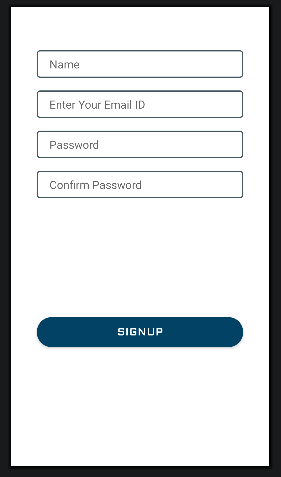
Create a “fragment_sign_up.xml” UI Design Layout.
<?xml version="1.0" encoding="utf-8"?>
<androidx.constraintlayout.widget.ConstraintLayout xmlns:android="http://schemas.android.com/apk/res/android"
    xmlns:app="http://schemas.android.com/apk/res-auto"
    xmlns:tools="http://schemas.android.com/tools"
    android:layout_width="match_parent"
    android:layout_height="match_parent"
    tools:context=".SignUpFragment">

    <EditText
        android:id="@+id/user_name"
        android:layout_width="0dp"
        android:layout_height="wrap_content"
        android:autofillHints=""
        android:background="@drawable/edit_text_bg"
        android:hint="@string/name"
        android:inputType="textPersonName"
        android:paddingStart="20dp"
        android:paddingTop="10dp"
        android:paddingBottom="10dp"
        android:textAllCaps="true"
        android:textColor="@color/purple_700"
        app:layout_constraintBottom_toBottomOf="parent"
        app:layout_constraintEnd_toEndOf="parent"
        app:layout_constraintHorizontal_bias=".5"
        app:layout_constraintStart_toStartOf="parent"
        app:layout_constraintTop_toTopOf="parent"
        app:layout_constraintVertical_bias=".1"
        app:layout_constraintWidth_percent=".8" />

    <EditText
        android:id="@+id/email_id"
        android:layout_width="0dp"
        android:layout_height="wrap_content"
        android:layout_marginTop="20dp"
        android:autofillHints=""
        android:background="@drawable/edit_text_bg"
        android:hint="@string/email_id"
        android:inputType="textEmailAddress"
        android:paddingStart="20dp"
        android:paddingTop="10dp"
        android:paddingBottom="10dp"
        android:textColor="@color/purple_700"
        app:layout_constraintBottom_toBottomOf="parent"
        app:layout_constraintEnd_toEndOf="parent"
        app:layout_constraintHorizontal_bias=".5"
        app:layout_constraintStart_toStartOf="parent"
        app:layout_constraintTop_toBottomOf="@+id/user_name"
        app:layout_constraintVertical_bias="0"
        app:layout_constraintWidth_percent=".8" />

    <EditText
        android:id="@+id/password"
        android:layout_width="0dp"
        android:layout_height="wrap_content"
        android:layout_marginTop="20dp"
        android:autofillHints=""
        android:background="@drawable/edit_text_bg"
        android:hint="@string/password"
        android:inputType="textPassword"
        android:paddingStart="20dp"
        android:paddingTop="10dp"
        android:paddingBottom="10dp"
        android:textColor="@color/purple_700"
        app:layout_constraintBottom_toBottomOf="parent"
        app:layout_constraintEnd_toEndOf="parent"
        app:layout_constraintHorizontal_bias=".5"
        app:layout_constraintStart_toStartOf="parent"
        app:layout_constraintTop_toBottomOf="@+id/email_id"
        app:layout_constraintVertical_bias="0"
        app:layout_constraintWidth_percent=".8" />

    <EditText
        android:id="@+id/confPassword"
        android:layout_width="0dp"
        android:layout_height="wrap_content"
        android:layout_marginTop="20dp"
        android:autofillHints=""
        android:background="@drawable/edit_text_bg"
        android:hint="@string/confirm_password"
        android:inputType="textPassword"
        android:paddingStart="20dp"
        android:paddingTop="10dp"
        android:paddingBottom="10dp"
        android:textColor="@color/purple_700"
        app:layout_constraintBottom_toBottomOf="parent"
        app:layout_constraintEnd_toEndOf="parent"
        app:layout_constraintHorizontal_bias=".5"
        app:layout_constraintStart_toStartOf="parent"
        app:layout_constraintTop_toBottomOf="@+id/password"
        app:layout_constraintVertical_bias="0"
        app:layout_constraintWidth_percent=".8" />

    <Button
        android:id="@+id/signup"
        android:layout_width="0dp"
        android:layout_height="wrap_content"
        android:background="@drawable/button_bg"
        android:fontFamily="@font/aldrich"
        android:text="@string/signup"
        android:textColor="@color/white"
        android:textSize="16sp"
        android:textStyle="bold"
        app:layout_constraintBottom_toBottomOf="parent"
        app:layout_constraintEnd_toEndOf="parent"
        app:layout_constraintStart_toStartOf="parent"
        app:layout_constraintTop_toBottomOf="@+id/confPassword"
        app:layout_constraintWidth_percent=".8" />

</androidx.constraintlayout.widget.ConstraintLayout>
Implement or Create “ViewPagerAdapter” Java File.
public class ViewPagerAdapter extends FragmentPagerAdapter {

    private final List<Fragment> fragmentName = new ArrayList<>();
    private final List<String> fragmentTitle = new ArrayList<>();

    // Constructor
    public ViewPagerAdapter(@NonNull FragmentManager fm) {
        super(fm);
    }

    @NonNull
    @Override
    public Fragment getItem(int position) {
        return fragmentName.get(position);
    }

    @Override
    public int getCount() {
        return fragmentTitle.size();
    }

    @Nullable
    @Override
    public CharSequence getPageTitle(int position) {
        return fragmentTitle.get(position);
    }

    // Add Fragment Manager
    public void AddFragment(Fragment fragment, String title) {
        fragmentName.add(fragment);
        fragmentTitle.add(title);
    }
}
Implement or Create “SignUpFragment” Java File.
public class SignUpFragment extends Fragment {

    @Override
    public View onCreateView(LayoutInflater inflater, ViewGroup container,
                             Bundle savedInstanceState) {
        // Inflate the layout for this fragment
        return inflater.inflate(R.layout.fragment_sign_up, container, false);
    }
}
Implement or Create “LogInFragment” Java File.
public class LoginFragment extends Fragment {

    EditText email, password;
    TextView forgotPassword;
    Button loginButton;
    float v = 0;

    @Override
    public View onCreateView(LayoutInflater inflater, ViewGroup container,
                             Bundle savedInstanceState) {
        // Inflate the layout for this fragment
        View view = inflater.inflate(R.layout.fragment_login, container, false);

        email = view.findViewById(R.id.email_id);
        password = view.findViewById(R.id.password);
        forgotPassword = view.findViewById(R.id.forgotPassword);
        loginButton = view.findViewById(R.id.loginButton);

        email.setTranslationX(800);
        password.setTranslationX(800);
        forgotPassword.setTranslationX(800);
        loginButton.setTranslationX(800);

        email.setAlpha(v);
        password.setAlpha(v);
        forgotPassword.setAlpha(v);
        loginButton.setAlpha(v);

        email.animate().translationX(0).alpha(1).setDuration(800).setStartDelay(300).start();
        password.animate().translationX(0).alpha(1).setDuration(800).setStartDelay(500).start();
        forgotPassword.animate().translationX(0).alpha(1).setDuration(800).setStartDelay(500).start();
        loginButton.animate().translationX(0).alpha(1).setDuration(800).setStartDelay(700).start();


        return view;
    }
}
Implement or Create “MainActivity” Java File.
public class MainActivity extends AppCompatActivity {
    ViewPagerAdapter viewPagerAdapter;
    CardView facebook, google, phone;
    float v = 0;

    @Override
    protected void onCreate(Bundle savedInstanceState) {
        super.onCreate(savedInstanceState);
        EdgeToEdge.enable(this);
        setContentView(R.layout.activity_main);
        ViewCompat.setOnApplyWindowInsetsListener(findViewById(R.id.main), (v, insets) -> {
            Insets systemBars = insets.getInsets(WindowInsetsCompat.Type.systemBars());
            v.setPadding(systemBars.left, systemBars.top, systemBars.right, systemBars.bottom);
            return insets;
        });

        TabLayout tabLayout = findViewById(R.id.tabLayout);
        ViewPager viewPager = findViewById(R.id.viewPager);
        facebook = findViewById(R.id.facebook_login);
        google = findViewById(R.id.google_login);
        phone = findViewById(R.id.phone_login);
        viewPagerAdapter = new ViewPagerAdapter(getSupportFragmentManager());

        // Add Fragment
        viewPagerAdapter.AddFragment(new LoginFragment(), "Login");
        viewPagerAdapter.AddFragment(new SignUpFragment(), "Signup");
        tabLayout.setTabGravity(TabLayout.GRAVITY_FILL);
        viewPager.setAdapter(viewPagerAdapter);
        tabLayout.setupWithViewPager(viewPager);

        facebook.setTranslationY(300);
        google.setTranslationY(300);
        phone.setTranslationY(300);
        tabLayout.setTranslationY(300);

        facebook.setAlpha(v);
        google.setAlpha(v);
        phone.setAlpha(v);
        tabLayout.setAlpha(v);

        facebook.animate().translationY(0).alpha(1).setDuration(1000).setStartDelay(400).start();
        google.animate().translationY(0).alpha(1).setDuration(1000).setStartDelay(600).start();
        phone.animate().translationY(0).alpha(1).setDuration(1000).setStartDelay(800).start();
        tabLayout.animate().translationY(0).alpha(1).setDuration(1000).setStartDelay(100).start();
    }
}
Output Result in Animation View Given Below.
……………….Thank You……………….